
Games to Play on the TV With Your Phones

When you host the crew, you need games to play on tv with phones to keep the night moving, whether that means Jackbox for quick laughs, a trivia app for casual crowds, or a digital board game like Sin of Angels, now in closed beta, when you want real strategy. Join the beta list and you get in early, phone-as-controller party mode included.
You do not want to pass a single plastic controller around a crowded room. You want a game on the big screen instead, one where everyone fights for the win right from their phone.
Low friction, high drama. You throw the main board up on the television. Everyone pulls out their device, connects to the room, and plots their next move. It keeps the friction low and the trash talk high.
Physical board games are great, but they come with heavy friction:
- You have to clear a massive table.
- You have to punch out hundreds of cardboard tokens.
- You have to spend an hour teaching the rules to a room full of people who just want to start playing.
Digital board games strip that friction away. The software enforces the rules and handles the math. You get the social experience of a tabletop game night without the administrative nightmare. You spend your time playing the players, not managing the pieces.
Key Takeaways
- Jackbox-style games win on quick laughs, digital board games win on depth and replay.
- Hidden information is the reason phone-as-controller setups beat one shared screen.
- A smart TV browser or an HDMI-connected laptop are the two easy ways to get a game on screen.
- Low latency matters more than bandwidth; these games are light on data but need instant input.
- Sin of Angels was designed around this exact TV-plus-phones format, free and browser-based.
The Phone as a Controller Setup
Explains phone-controller vs. mirroring, and joining a TV game via room code, no app.
A phone-as-controller setup is different from screen-mirroring. Mirroring means casting your phone's screen to the TV, and it is clunky. It lags.

True phone-controller games for TV are built for the crowd instead. The television acts as the public game board. Your phone acts as your private hand of cards, your command center, and your voting booth.
The right game handles a full room. It scales from a tight crew of three up to a massive group, and setup has to be instant.
Getting everyone connected:
- You load a webpage or launch an app on the television.
- Players join via a simple room code.
- No app downloads are required for the guests.
Remote play matters too. The best online party games with phones let you stream the main screen over a video call. Remote friends punch in their moves locally. It bridges the gap when the crew is scattered. You can have three people on the couch and three across the country. Everyone looks at the same board and fights for the same turf.
Setting Up Your Living Room
Covers smart TV browser vs. HDMI-laptop setup, and why latency beats bandwidth here.
The easiest way to get a game onto your TV is through the built-in browser on a smart TV. Just open it and navigate straight to the game lobby. This is the cleanest method. The television handles the graphics, and your network handles the connection to the phones.
If your television does not have a good browser, you hook up a laptop instead:
- You run an HDMI cable from the computer to the screen.
- You load the game on the laptop, make it full screen, and turn up the volume.
- The laptop acts as the host machine. The players still just use their phones to join the room code.
A stable internet connection matters most here. These games do not require massive bandwidth, but they do require low latency. Someone taps a button to lock in a vote or launch an attack. The television needs to register that input immediately. A solid connection keeps the game moving without frustrating delays.
The Best Categories for Game Night

People always look for Jackbox games when they want this setup. They dominate the room with trivia, drawing contests, and wordplay. But game nights need variety. You can only draw so many terrible pictures before the group gets restless.

- Quiz games to play on tv with phone setups test who knows the most useless facts. These are fast and competitive.
- Family games to play on tv with phones keep things clean for a mixed crowd.
- Board game apps for tv give the group real strategy instead of just shouting punchlines.
Here is how the options break down for multiplayer games phone controller tv setups.

| Game Category | Best For | Primary Control |
|---|---|---|
| Jackbox Games | Quick laughs and casual crowds | Mobile browser room code |
| Trivia & Quiz Apps | Testing general knowledge | Mobile browser or app |
| Digital Board Games | Deep strategy and area control | Mobile browser or app |
| Sin of Angels | Outlaw-MC gang warfare | Mobile browser |
How to choose in ten seconds: run the Fit Test. Ask two questions.
- Does the game need hidden information? If players must hide cards, cash, or secret orders, you need personal phone screens, not a shared shout-fest.
- Do you want trivia speed or real strategy depth? Jackbox-style games win on quick laughs. Digital board games win on depth and replay.
Match your answers to the table above and you land on the right category before the group gets restless.
What "free" actually gets you:
- Free games to play on tv with phones are usually ad-heavy trivia or basic drawing apps.
- If you want meat on the bone instead of ads, look for strategy.
- Party games to play on tv with phones do not have to be shallow. You can run deep, cutthroat tabletop adaptations right from your couch, if the game is built to handle the weight.
Sin of Angels was built for exactly this setup, board on the TV, hands on the phones. It's in closed beta now: get on the list and party mode is waiting when your invite lands.
The Strategy of Hidden Information
Explains why splitting public TV info from private phone hands enables secret deals.

Most strategy games in this genre run on hidden information, and that is exactly why the phone works so well. When you play a strategy board game, you need to keep your cards close to your chest. If everyone shares one screen, you cannot hide your resources or your next move.
Using personal screens solves the problem. The television shows the public state of the game:
- The map
- The scores
- The active battles
Your phone shows your private hand instead:
- Your cash reserves
- Your weapon stash
- The secret orders you plan to execute
You lock in your moves on your device. When everyone is ready, the television reveals the chaos all at once.
What this does to the room:
- Players whisper in corners and send texts to cut secret deals.
- They look at the big screen to see who is taking the lead.
- Then they look down at their hands to figure out how to kneecap them.
It turns a standard game night into a room full of shifting alliances and sudden betrayals.
Claim the Turf in Sin of Angels
Details Sin of Angels: crew-building, site-taking, Brawl combat, and beta access.
What the Game Is
The TV-plus-phones setup described above is not an afterthought bolted onto Sin of Angels, it is the format the game was designed around from day one. You run your own outlaw motorcycle club in a gritty California underworld. You muscle rival gangs off the streets, run guns, and bleed the town dry, all while the public board sits on the big screen and your hand stays private on your device.
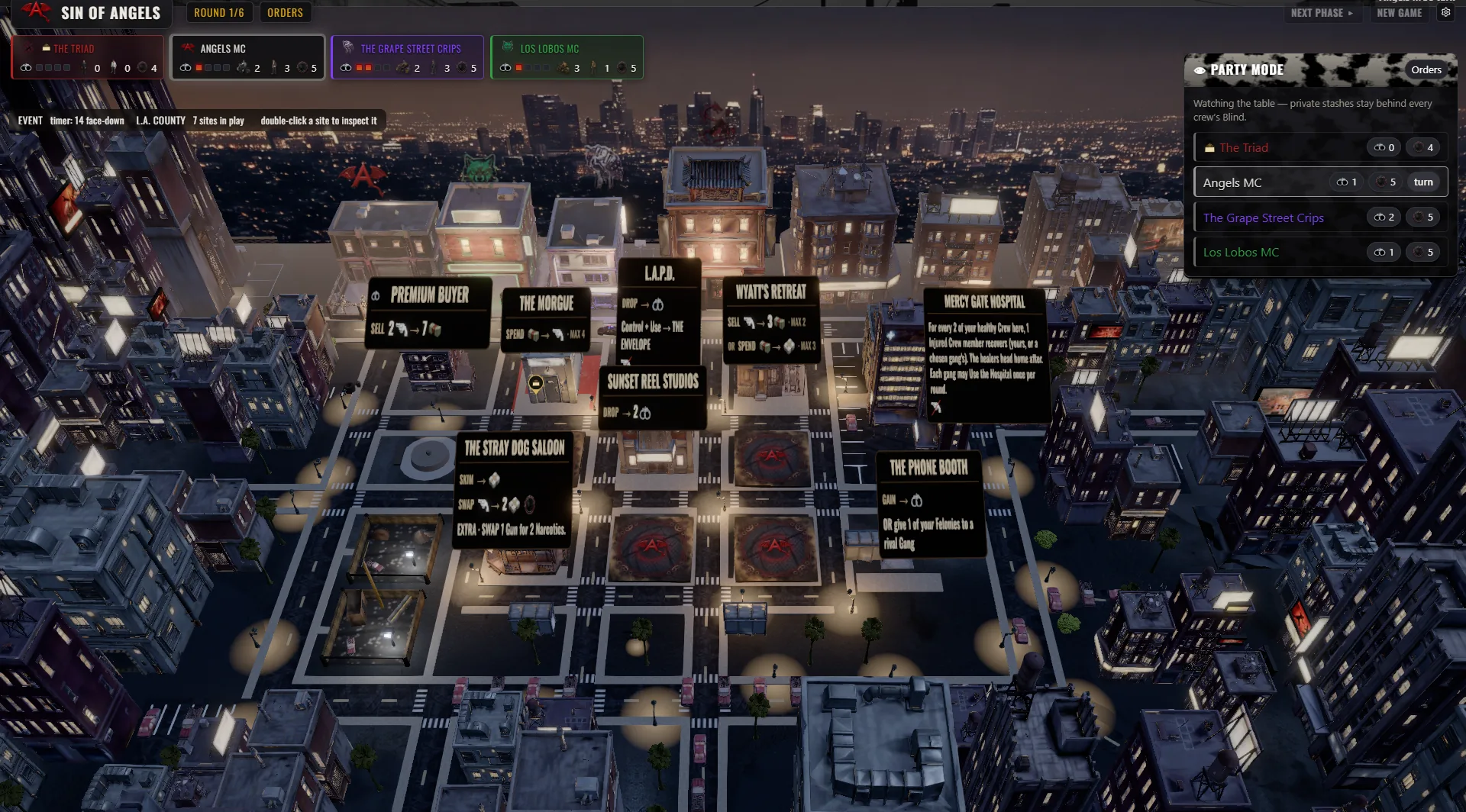
It is a digital adaptation of the gang-warfare tabletop format, built specifically for the party mode experience. You throw the 3D board on a TV, and each player uses their own phone to command their crew.
How you access it:
- The game plays right in your web browser. There is no install.
- Every device runs it well, including the iPhone via the browser.
- The native Android app is on the way.
- Sin of Angels is coming to Steam for PC players.
For a local game night, the browser is what makes this simple: no install, no client. Beta players just load the page and play.
Building Your Crew and Taking Sites
You build your crew from the ground up. You bring in patched members and recruits to do your heavy lifting. Then you take Sites. The board is a map of L.A. County filled with fronts, and you move your riders into:
- Dive bars
- The Iron Works
- The Morgue
- The Picket Fence Lab
- San Pedro Docks
- A strip joint
- High Desert Trading Post
Every location is a Site you can use for cash, guns, or Narcotics.
You run the economy. You trade on The Silk Road and manage your Felonies with the law. You also spend orders each turn to outmaneuver the other clubs. You cut deals with rival gangs to secure a border. You forge ceasefires and alliances. Then you break them. Betrayal is part of the business.
The Brawl
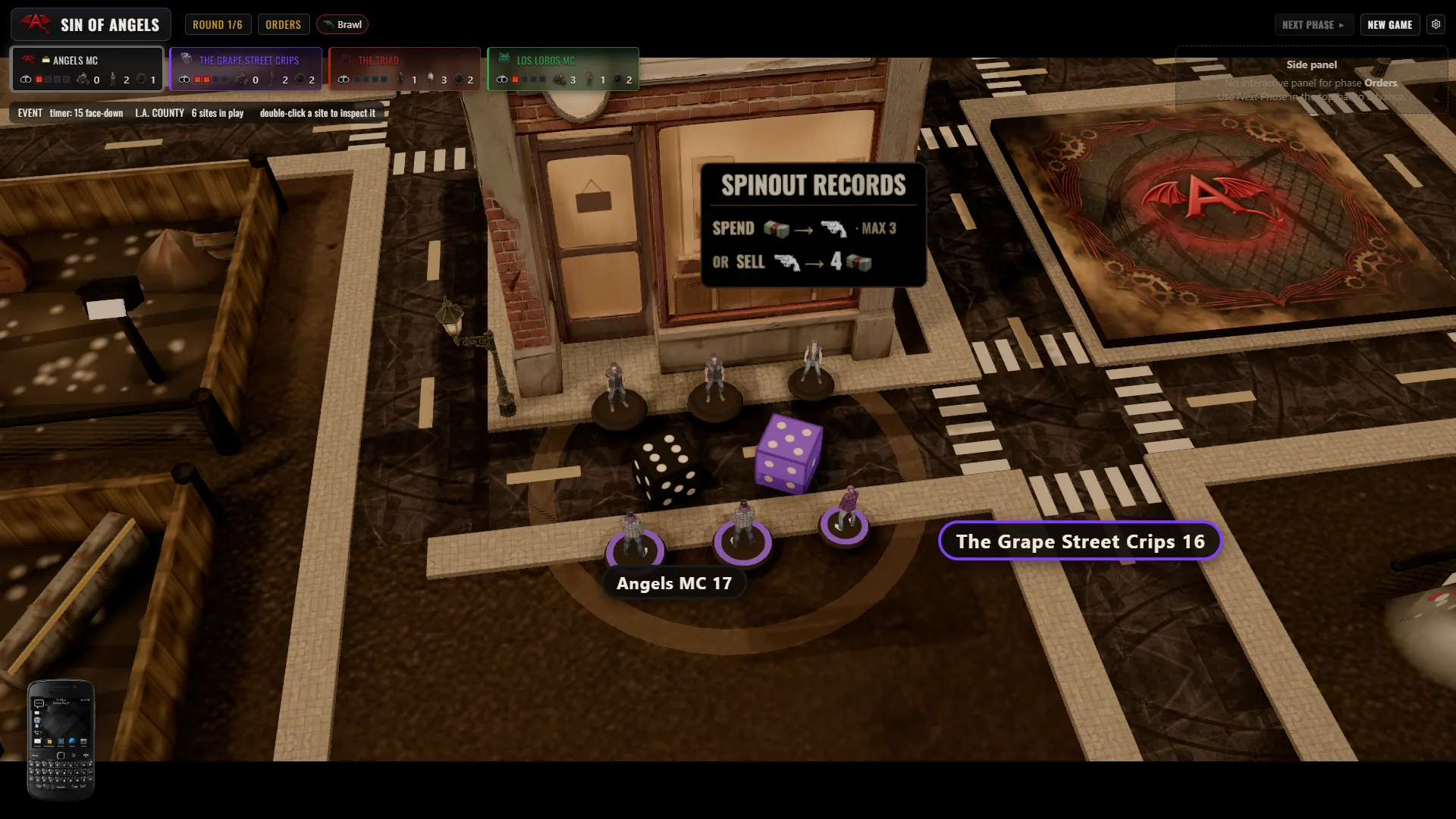
When clubs clash on a site, it is a Brawl. This is not just a math equation or a dice result. The game triggers a cinematic 3D battle on the television.
You watch the gang fight play out with guns and muscle. When a rider goes down, the game plays an atmospheric death vignette. It is a memento-mori cutscene that marks the loss.
Length, Players, and Atmosphere
One game runs about six rounds. It fits perfectly as a quick match or the main event for a full game night. Up to six gangs can fight for the town, mixing human players and a smart AI opponent. You win the game by holding the most cash when round six ends.
The atmosphere hits hard. The game features a real soundtrack with an original outlaw-country and dark-Americana album. You hear per-location ambience and punchy sound effects as you move across the board. You can even browse the in-game library to check out cards, cinematics, and music right from the app.
How You Can Play
You can play your way:
- Run a solo campaign against a real AI opponent.
- Play online with friends across different devices.
- Pass a single screen around the room.
- Fire up party mode, put the 3D board on the TV, and let everyone plot their hostile takeovers from their phones.
Join the Beta
Sin of Angels is in closed beta at soa-game.com. Get on the list, and early players get in first and help shape the finished game.
Related Guides
- Sin of Angels: The Outlaw Motorcycle Club Strategy Board Game
- The Best Games to Play Over Zoom With Friends
- The Best Games to Play Over Discord
- Virtual Game Night Ideas That Actually Work
Frequently Asked Questions
Can I play phone games on my TV?
Yes, you can play specific party games on your television while using your phone as the controller. You load the main game on your smart TV browser or a connected laptop. Then, you use your phone to join a room code and control your moves privately.
What are fun games to play on your TV?
The best games for a television setup are party games and digital board games built for a crowd. Trivia apps, drawing contests, and strategy games like Sin of Angels thrive on the big screen. They let everyone look at a shared board while plotting their moves on their own devices.
Which games can we play on a smart TV?
You can play any browser-based party game directly through a smart TV web browser. Games that use room codes do not require you to download heavy applications to the television itself. You just navigate to the game website on the TV and have players join from their mobile browsers.
How to play mobile phone on TV?
Instead of mirroring your screen, look for games designed with a phone-as-controller setup. You open the game lobby on your television screen to display the main board. Then, you navigate to a specific web address on your phone, enter the room code, and your phone syncs automatically with the TV.
What games can I play on my TV?
You can run everything from casual quiz games to deep area-control strategy games on your television. If a game supports Jackbox-style room codes, it will work perfectly on a big screen. Turn-based strategy board games are especially strong choices because they give everyone time to plan their moves privately.
Take Over the Town
The best game nights happen when everyone fights for the same prize on the big screen. Throw the board on the television, connect from your phones, and see who has the muscle to claim the town. Get Early Access.