
How to Play Board Games Online Free (No Download)

Want to play board games online free? You have three main paths: 3D physics sandboxes like Tabletopia where you handle the rules yourself, automated rules engines like Board Game Arena that enforce every rule for you, and standalone browser games like Sin of Angels that need no download at all.
Key Takeaways
- 3D sandboxes like Tabletopia hand you a virtual table but do not enforce rules for you.
- Automated engines like Board Game Arena calculate scores and stop illegal moves automatically.
- Standalone browser games need no account or software, just a shared link.
- Steam and mobile apps usually require every player to buy or download their own copy.
- Sin of Angels is browser-only and rule-automated with no install, currently in closed beta.
None of them require you to drop cash or make your friends install heavy software just to start a game night.
The right choice depends on your group. Some players want classic board games online with simple rules they already know. Others want a heavy strategy board game they can throw on the living room TV while everyone plots from their phones.
We built Sin of Angels to fill a specific gap. It is an outlaw motorcycle club strategy game built to run online, solo, or locally, right in your browser. It's in closed beta now, so before you get on the list to claim your turf in our town, you need to know how the rest of the digital tabletop space works.
The Options Sorted by Category
The market for multiplayer board games online splits into three formats. You are usually choosing between a 3D sandbox, an automated rules engine, or a ready-made standalone game.
The Three-Question Test
Before you pick a platform, run your group through three questions. This is the fastest way to sort the noise.
- Do you want the computer to enforce the rules, or do you want to self-referee? If you want the computer to handle the math, go automated. If you want the tactile feel of moving pieces yourself, go sandbox.
- Will everyone actually install something? If the honest answer is no, a standalone browser game is your only real option.
- Is this a one-off session or a recurring game night? Sandboxes and automated engines reward repeat play, since your group learns the interface over time. A standalone browser game is built for the one-off, drop-a-link session.

This is the same test we ran before building Sin of Angels. No install, no rules to learn, no gap between clicking a link and taking your first turn.
The 3D Sandbox Simulators
A 3D sandbox like Tabletopia gives you a virtual table and a box of pieces. It does not enforce the rules. If you want to move a piece illegally, the game lets you. If you want to flip the table, you can.
This format is great if you want the tactile feel of moving pieces on a map or drawing cards from a deck. It requires your group to know the rules, just like a physical game night. You handle the math. You track the phases.
Automated Rules Engines
An automated engine like Board Game Arena does the heavy lifting for you. It is the giant in this space. The platform enforces every rule, calculates the scores, and stops you from making illegal moves.
This is the best route when you want to learn a new game without reading a massive manual. The engine handles worker placement, area control logic, and resource tracking. It keeps the game moving fast.
Ready-Made Browser Games
A ready-made browser game skips the platform entirely. You send a link, your friends click it, and you start playing. Standalone browser games require no central account. Sites like BuddyBoardGames or FreeBoardGames.org let you spin up a lobby instantly. You will also find casual arcade listings on sites like CrazyGames.
These are multiplayer browser games to play with friends when you have zero time for setup. You click the link, pick a color, and go.
Free vs Paid and Platform Support
Free means something different depending on where you look. You need to know how these platforms handle paywalls and device support before you pitch a game to your crew.

| Platform Type | Install Required | Device Support | Free Access |
|---|---|---|---|
| Browser Games | None | Laptop, tablet, or phone, runs in Chrome or Safari | Usually free to join; premium lobby creation can require a paid subscription |
| Steam / PC | Steam client plus the game itself | PC only | Rarely free, everyone in the group usually buys their own copy |
| Mobile Apps | App store download | Phone or tablet, cross-platform play can break | Mixed, sometimes free on one store and paid on another |
Browser Games
Browser games are the most accessible format, period. If you want board games to play online free, the browser is where you start. There is no software to install. You do not need a gaming PC.
You can play on a laptop, a tablet, or a phone. Many of the best online board games run entirely in Chrome or Safari. Free tiers on major platforms usually let you join games at no cost, even if creating a premium game lobby requires a paid subscription.

Steam and PC Gaming
Steam is the heavy hitter for polished, fully animated board game adaptations, but it is rarely free. You will find incredible versions of tabletop classics here.
The catch is the barrier to entry. Everyone in your group usually needs to buy their own copy, install the Steam client, and have a computer that can run it. If you want free online board games multiplayer experiences, Steam is a tough sell for a casual group.
Mobile Apps
Mobile apps are a mixed bag. Some groups love them, but the setup kills momentum fast. Forcing everyone to visit an app store, download a file, and create an account slows down a game night before it starts.
Cross-platform play between different mobile operating systems can also break down. A game might be free on one store and paid on another.
That table above is basically the checklist we used when we built Sin of Angels: browser-only, no download to wrestle with, works no matter what device shows up. It is in closed beta right now, so the list is where you get in line. Get on the Beta List
Why Browser Games Win for Game Night
Browser games win because they remove friction from game night, and friction is your biggest enemy. You finally get five friends to agree on a time. Everyone logs on. Then the problems start:
- One person has an outdated operating system.
- Another person forgot their Steam password.
- Someone else does not have enough storage space on their phone to download a new app.
Browser games skip all of that. You drop a link in the group chat. Everyone clicks it. The game loads. That is the entire process.
This is why the browser is the easiest format to actually get a group to use. It bridges the gap between hardcore strategy players and casual friends who just want to hang out.
You can run complex area control games or simple card games without anyone needing a gaming rig. If a device has a web browser, it has a seat at the table.
How Sin of Angels Fits
Details Sin of Angels' four game modes, six-round core loop, brawls, and soundtrack.

The friction described above, mismatched devices, forgotten passwords, a client nobody wants to install, is precisely the problem Sin of Angels set out to solve. It is a turn-based area-control strategy board game. You run an outlaw motorcycle club in a gritty California underworld. You muscle rival gangs off the streets, run guns, and bleed the town dry.
It is a standalone game, not a platform. We built it specifically to be the browser-only, no-install, party-mode pick for your crew.
Play Your Way Across Devices
Sin of Angels runs on desktop, tablet, and phone with zero install, because it lives entirely in your browser. We do not have a native iOS app, because iPhone users just play it flawlessly in the browser. A native Android app is planned, and it is coming to Steam for PC, no date yet. But the browser is the core experience.
You can run it as a 2 player board games online free match, or scale it up. A full game handles around two to six gangs, mixing humans and AI.
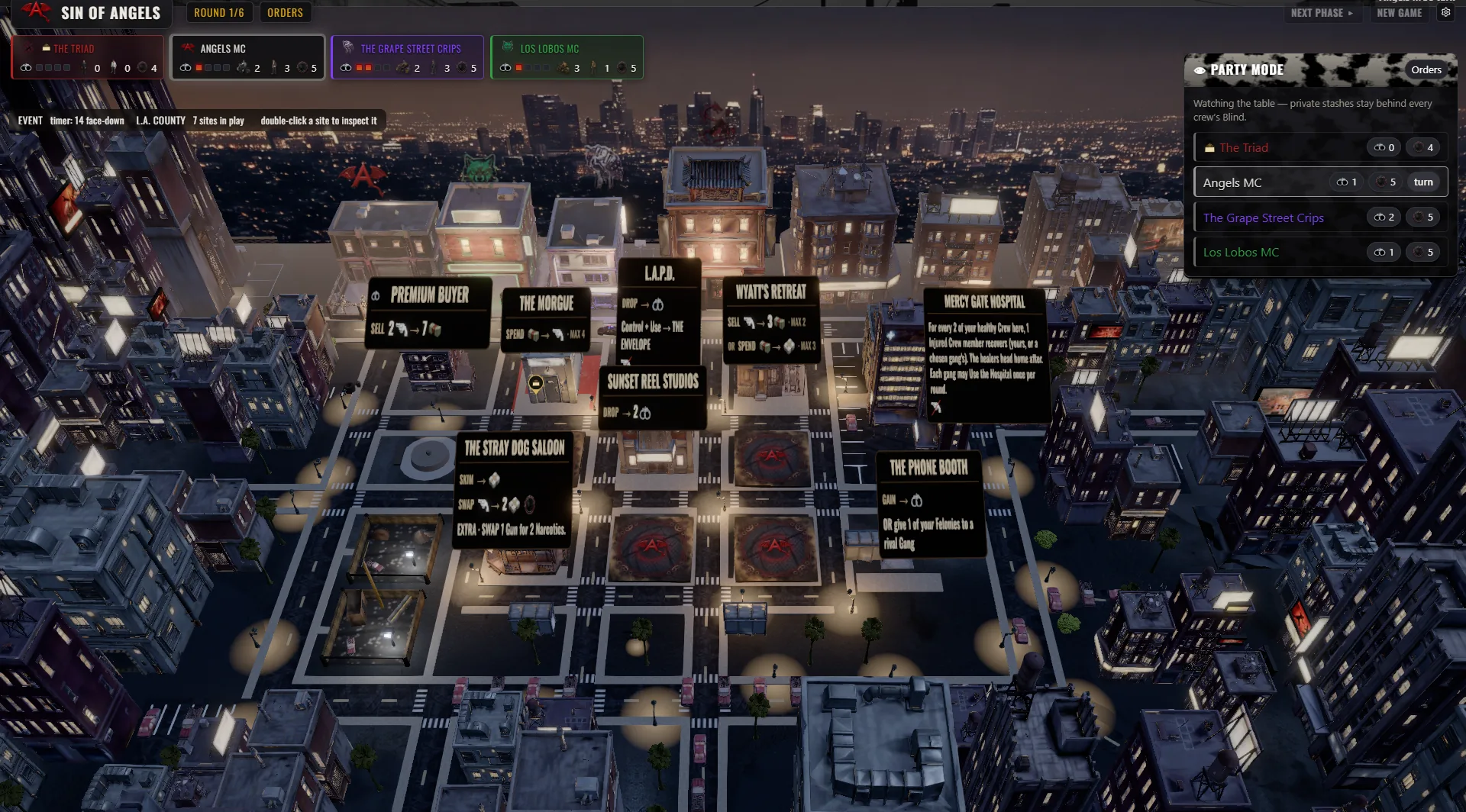
The Game Modes
The game supports four ways to play, so it fits however your crew wants to show up.
- Online Multiplayer: Cut deals and break them with friends across the country. It is built for online board games with friends.
- Party Mode: Throw the 3D board up on your living room TV. Everyone plays from their own phone. No passing a controller. No looking at each other's hidden cards.
- Solo vs AI: You do not need a group to ride. Play solo against a smart AI opponent that knows how to hold a grudge.
- Local Pass-and-Play: Run the whole town from a single screen if you need to.

The Core Loop
One game runs about six rounds, built around loyalty, turf, and betrayal. This is not a casual dice roller. You can run a quick match or make it the main event of your game night.
You start by building your crew. You bring in patched members and recruits. Then you take territory. You move your bikers onto the town's sites. The map is a dark slice of Americana, with fronts including:
- Dive bars
- The Iron Works
- The Morgue
- Picket Fence Lab
- San Pedro Docks
- The Velvet Cage
- High Desert Trading Post
- The 110 Underpass
Every location is a front you can use for cash, guns, or Narcotics. You run the economy by trading through The Silk Road and managing your Felonies with the law. You spend orders each turn to maneuver your club into power.
Cut Deals and Brawl
Alliances in Sin of Angels are temporary by design. You cannot hold the town alone. The board is too big, and your crew is too small. You have to forge ceasefires and alliances with rival clubs. You share turf. You trade resources. You promise them backup.
Betrayal. And then, when the time is right, you turn on them.
When clubs clash on a site, it is a Brawl. In most digital board games, combat is a simple math calculation. We wanted it to feel like a real fight:
- You roll the dice.
- You spend your guns.
- You watch your bikers fight it out in a cinematic 3D battle.
The stakes are permanent. When a rider goes down, the game plays an atmospheric death vignette, a brutal, animated memento mori. Control the most territory to bankroll your crew, survive the Brawls, and rack up the most Cash by the end of round six to win.

A Real Soundtrack and Atmosphere
Sin of Angels has a full original soundtrack, not a silent board. It is a dark-Americana and outlaw-country album that sets the tone for the entire night. Every location on the map has its own per-location ambient audio, and the sound effects are punchy.
You can even browse the in-game library to look at the cards, rewatch the cinematics, and listen to the music directly from inside the app.
Get In Early
Sin of Angels is in closed beta at soa-game.com. Get on the list and play early, and your bug reports help shape what ships.
Related Guides
- Sin of Angels: The Outlaw Motorcycle Club Strategy Board Game
- Is Board Game Arena Free? What You Get, and the Alternatives
- Board Game Arena Alternatives Worth Trying
- The Best Board Games on Steam (and Where to Play Free)
Frequently Asked Questions
Are there any free online board game platforms that require no download or sign-in?
Yes. Sites like BuddyBoardGames and FreeBoardGames.org let you spin up a game instantly in your browser. You just share a link with your friends. There is no software to install and no account creation required to start playing.
What's the best way to play board games online with a group of friends on their own devices?
Browser-based games are the most reliable option for mixed devices. Everyone can use their own phone, tablet, or laptop without worrying about app store compatibility. Games with a dedicated party mode let you put the main board on a TV while everyone manages their hand on their personal screen.
Sin of Angels is built around exactly that setup, browser-only on phone, tablet, or TV, with a party mode that keeps everyone's hand private on their own screen. It is in closed beta now, so the lobby pool will start smaller than an established platform's until the beta list opens up.
Can you play strategy board games online against AI or bots, not just other people?
Many digital board games include AI opponents for solo play. Automated platforms and standalone digital adaptations usually feature bots to fill empty seats. Sin of Angels features a dedicated solo mode against a smart AI that understands area control and alliances.
What's the difference between a browser-based board game and a downloadable one?
Browser games run directly in Chrome, Safari, or Edge and require zero installation. Downloadable games, like those on Steam or mobile app stores, require hard drive space and a specific operating system. Browser games are generally easier to get a casual group to play quickly.
Are free online board games actually free, or do they gate content behind a paywall?
Most major platforms operate on a freemium model. You can usually join games for free, but creating a lobby for premium games requires a paid subscription. Open-source sites and ad-supported arcade portals offer completely free access to their entire libraries.
Claim Your Turf
You do not need to spend money or force your friends to download heavy software to get a game night going. The browser is the best place to gather your crew. If you want a heavy, gritty strategy game you can throw on the TV while everyone plots from their phones, we have your table ready when the beta opens.